How Family Tree Now Search and Genealogy Research Work
Learn how a Family Tree Now search works—from starting with known relatives to finding records, checking matches, building a tree and protecting privacy.
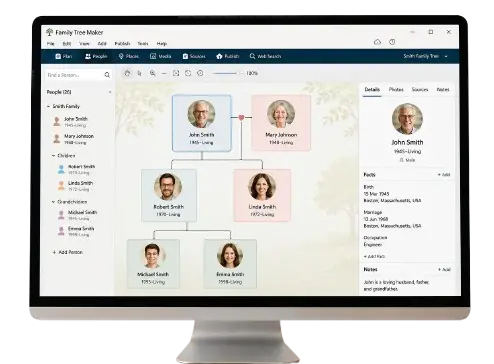
How Family Tree Now Works: From One Name to a Documented Family Tree
A family tree is not discovered in one search. It is built through a cycle: begin with known people, ask a focused question, find possible records, compare identities and add only conclusions supported by evidence.
Family-TreeNow.com organizes that process through practical guides about people search, relatives, public records, family-tree building, accuracy and privacy. It does not claim to be FamilyTreeNow.com and does not provide access to another company’s proprietary database.
The Family Tree Now Research Cycle
The complete process has seven stages:
- Start with a known person
- Define one question
- Choose the right source
- Search with names, dates, places and relatives
- Compare possible matches
- Add the fact and source to the tree
- Review privacy, accuracy and next steps
You may repeat this cycle hundreds of times. Each cycle should answer one manageable question.
Step 1: Start With What You Know
Begin with yourself, your parents or another person whose identity is established. Record:
- Full name
- Birth, marriage and death details
- Places lived
- Spouses, parents, siblings and children
- Occupations
- Photographs and documents
- Source of each fact
Separate firsthand knowledge from family stories. “I attended my grandmother’s funeral in 2008” has a different basis from “someone said her father was from Ireland.”
Step 2: Ask One Focused Question
Good research questions are specific:
- Who were this person’s parents?
- Which county recorded the marriage?
- Is this census household the correct family?
- What happened to a sibling after leaving home?
- Does this people-search profile belong to my cousin?
Avoid “find my entire ancestry.” A narrow question helps you choose sources and know when the evidence is sufficient.
Step 3: Choose the Right Record Type
Match the question to the source.
| Question | Useful starting sources |
|---|---|
| Who were the parents? | Birth, baptism, marriage application, probate |
| Where did the family live? | Census, directories, property and tax records |
| What was a woman’s birth surname? | Marriage application, children’s birth records, probate |
| When did the person die? | Death certificate, obituary, cemetery, probate |
| Did the person serve? | Personnel file, compiled service record, pension, discharge |
| Where did an immigrant come from? | Passenger list, naturalization, census, church record |
| Is this a living relative? | Known family information and lawful public context |
A search engine is a route to a source, not the source itself.
Step 4: Search Broadly, Then Narrow
Start with the strongest identifiers and adjust one variable at a time.
Use:
- Exact name and variations
- Maiden and previous surnames
- Approximate year ranges
- City, county, state or country
- Spouse or parents
- Children
- Occupation or military branch
If a search fails, remove filters. If it produces hundreds of results, add a relative or location. Read the collection description to make sure it covers the right period and place.
Step 5: Compare the Match
Do not add the first result. Compare:
- Name
- Age
- Birthplace
- Residence
- Spouse
- Parents
- Children
- Occupation
- Timeline
Look for another same-name person. A strong match fits several independent details without forcing the facts.
Step 6: Open the Full Record
Indexes show selected text. The original image may contain:
- Additional relatives
- Marginal notes
- Witnesses
- Addresses
- Correct handwriting
- Information omitted from the index
Review nearby entries. Family members may appear on the same page or in adjacent households.
Step 7: Add the Source and Explain the Conclusion
Record not only the date but why the record belongs to the person.
Example note:
The 1930 household is identified as the correct family because the names of both parents, the children’s ages, the father’s occupation and the Cleveland address agree with the 1928 city directory and a 1932 birth certificate.
Attach a citation containing collection, jurisdiction, date, page or file number, repository and access details.
How the Main Family-TreeNow.com Guides Work Together
People Search
Use when the target is living or recently deceased. It explains identity comparison, lawful purpose and respectful contact.
Find Relatives
Use when you know part of the family but need to connect a missing branch, descendant or DNA match.
Public Records
Use to identify the official custodian, understand restrictions and choose between indexes, informational copies and certified records.
Genealogy Records
Use to plan research across census, church, immigration, probate, military and other historical sources.
Family Tree Maker
Use to choose a platform, organize profiles, add sources, export data and create backups.
Record-Specific Guides
The birth, death, marriage, census and military pages explain what each record can contain, how access works and which errors to expect.
Accuracy and Privacy
Use Accuracy before accepting matches and Privacy and Safety before sharing living-person information.
How People-Search Websites Generally Work
Third-party people-search websites may compile information from public, licensed and commercial sources. They can link names with addresses, phone numbers and possible associates.
Compiled information may be:
- Outdated
- Incomplete
- Duplicated
- Attached to a similar person
- Based on household association rather than kinship
A third-party profile is not the same as an official public record. Trace important facts back to their original source.
If you need to remove a profile from FamilyTreeNow.com, use our independent Opt-Out Guide and the official procedure on that company’s website.
How Online Family-Tree Hints Work
Genealogy platforms can compare details in your tree with records or other trees. A hint usually means that names, dates, places or relatives are similar. It does not mean the identity is proven.
Before accepting:
- Open the underlying source.
- Read the entire record.
- Compare the household or relatives.
- Search for alternate candidates.
- Decide which facts are actually supported.
- Cite the source.
The more accurate your starting tree, the more useful automated suggestions can become.
What “Free” Means
Some parts of family research cost nothing: interviews, home documents, free archives, public indexes and basic tree tools. Other services may charge for certificates, subscriptions, staff research, DNA tests or document copies.
Before paying:
- Check whether a library provides access
- Confirm collection coverage
- Read renewal terms
- Determine whether images are included
- Check export and cancellation options
- Use official government ordering routes
Family-TreeNow.com cannot guarantee that an external archive or service is free.
How to Build a Reliable Family Tree
Follow four rules:
One generation at a time
Prove the parent-child connection before moving backward.
One identity at a time
Keep similar people separate until evidence supports a merge.
One source at a time
Read the source instead of accepting the index summary.
One citation for every important fact
Make it possible to repeat your research.
These rules slow the first hour but save days of correcting a wrong branch.
What Happens When Records Conflict?
Do not choose the record you prefer. Create a table showing each claim, source, informant and creation date. Decide which evidence is closest to the event and most independently supported.
Use confidence labels such as proven, probable, possible and disproved. Update the tree when stronger evidence appears.
How Privacy Fits Into the Workflow
Before publishing:
- Mark living profiles private
- Remove full birth dates and addresses
- Ask permission for photographs
- Redact identifiers
- Check collaborator access
- Review DNA implications
- Export a secure backup
Researching a living relative does not create permission to expose them.
A Beginner’s First 30 Minutes
First 10 minutes
Write your name, parents and grandparents. Add approximate dates and places.
Next 10 minutes
Choose one missing fact, such as a grandmother’s birth surname. List what you already know.
Final 10 minutes
Identify the most relevant record—perhaps a marriage application—and note the correct place and year range. Begin one focused search.
Do not attempt to add ten generations. Build a strong first connection.
Frequently Asked Questions
Is Family-TreeNow.com a people-search database?
It is an independent family-history information resource. It does not claim to be FamilyTreeNow.com or to control another company’s records.
How does a Family Tree Now search begin?
Start with a known person, define one question and search the record type most likely to answer it.
Does a search result prove a relationship?
No. Compare names, dates, places, relatives and original records before adding the connection.
Can I create a family tree for free?
Many tools offer free tree creation, but storage, records, media or export limits vary.
Where do genealogy records come from?
They can come from government offices, archives, churches, newspapers, cemeteries, families and other institutions. The creator and purpose affect reliability.
What should I do if information is wrong?
Correct your own tree with an explanatory note. For a third-party profile, use that website’s correction, privacy or opt-out process.
Start With One Verified Connection
Family Tree Now works best as a repeatable research method: ask, search, compare, cite and protect. Each verified relationship becomes a trustworthy foundation for the next generation.
Continue with: