Family Tree Maker
Family Tree Maker | Build Your Ancestry Chart Online the world’s largest collection of online family history records makes it possible.
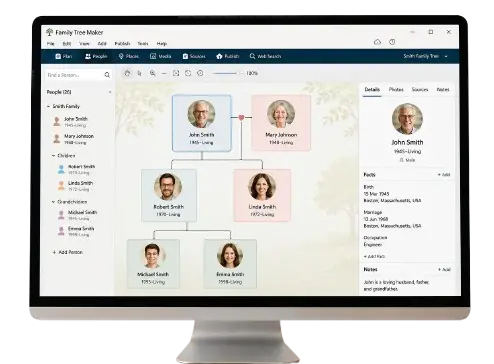
Complete Guide to Family Tree Maker: Features, Benefits, and Setup
Creating a family tree is more than just listing names and dates on a piece of paper; it is an extraordinary journey into your personal history, heritage, and identity. For decades, researchers, historians, and genealogy enthusiasts have relied on software solutions to organize complex ancestral lines. Among the various tools available today, Family Tree Maker (FTM) stands out as one of the most powerful, flexible, and feature-rich desktop software applications for building and preserving family histories.
Whether you are a complete beginner eager to trace your grandparents’ roots or an experienced genealogist managing thousands of records, Family Tree Maker offers the exact capabilities needed to keep your research structured, accurate, and visually compelling.
What is Family Tree Maker?
Developed originally in the late 1980s and currently maintained and updated by Software MacKiev, Family Tree Maker is a dedicated desktop software program available for both Windows and macOS. Unlike basic online-only tree builders, Family Tree Maker allows you to maintain total ownership of your data on your local computer while seamlessly integrating with massive online databases.
The software acts as a central hub for all your family history data. It combines family tree diagrams, historical document storage, media galleries, map-based location tracking, and customizable reporting into a single intuitive interface.
Why Choose Family Tree Maker for Your Genealogy Projects?
While there are many online genealogy platforms available, Family Tree Maker continues to be a top choice for serious researchers due to several key advantages:
1. Complete Data Ownership and Privacy
When you build a tree exclusively on a cloud-based platform, your data relies heavily on subscription access and server availability. Family Tree Maker stores your complete tree, high-resolution media, and research notes locally on your hard drive. You decide who sees your family history and how it is shared.
2. Full Offline Access
You do not need an active internet connection to work on your family tree. You can take your laptop to archives, cemeteries, libraries, or family reunions, adding photos, birth dates, and interview notes completely offline.
3. Dual Integration with Ancestry and FamilySearch
Family Tree Maker features built-in integration with two of the world’s largest genealogical databases: Ancestry.com and FamilySearch.org. This allows you to search billions of historical records directly within the software and merge record details into your tree with just a few clicks.
Top Key Features of Family Tree Maker
Family Tree Maker is packed with tools designed to solve the real-world challenges faced by genealogy researchers.
1. TreeSync® / FamilySync® Technology
One of FTM’s defining capabilities is FamilySync®. If you maintain an online tree on Ancestry.com, FamilySync lets you connect your desktop tree with your web profile. Any change made on your desktop—such as adding a photo or editing a date—can be synchronized automatically with your online Ancestry tree, and vice versa.
2. Interactive Mapping (Places Workplace)
Family history becomes much more meaningful when you understand where your ancestors actually lived. FTM includes an interactive map workspace that plots events (births, marriages, military service, land purchases) geographically. You can visualize ancestral migration routes across countries over decades or centuries.
3. Comprehensive Media Management
A family tree without photos and original documents lacks life. FTM allows you to attach unlimited photographs, scanned birth certificates, audio interviews, video clips, and PDF documents to specific individuals or family branches. The built-in photo repair tool helps crop, clean, and fix old faded family portraits directly within the program.
4. Advanced Color Coding
Organizing large family trees with thousands of individuals can quickly become overwhelming. FTM provides multi-layer color coding that lets you assign distinct colors to specific ancestral lines (e.g., maternal line in blue, paternal line in green). This makes navigating complex lineage charts remarkably simple.
5. Custom Charts and Photo Books
Sharing your discovery is one of the most rewarding parts of genealogy. Family Tree Maker includes a powerful chart designer that creates printable:
-
Pedigree Charts
-
Descendant Trees
-
Hourglass & Fan Charts
-
Kinship Reports & Family Books
You can customize borders, fonts, background images, and color palettes to create heirloom-quality wall charts or PDF books to gift during family reunions.
Step-by-Step: How to Build Your Ancestry with Family Tree Maker
Building a comprehensive family tree does not have to be intimidating. By following a structured process, you can build a rich, detailed history without feeling lost.
Step 1: Start with What You Know
Begin by adding yourself, your parents, siblings, and grandparents. Enter basic information such as full birth names, birth dates, birthplaces, and marriage details. Do not worry about missing dates or unknown ancestors at this stage—focus on establishing the initial foundation.
Step 2: Organize and Attach Existing Media
Gather physical family assets like old photo albums, birth certificates, letters, and military records. Scan these files and attach them directly to the corresponding individuals in your FTM workspace. Keeping media organized right from the start saves hundreds of hours later.
Step 3: Utilize Web Hints and Historical Records
Once your basic tree is created, enable web search integration within FTM. Green hints (from Ancestry) or blue hints (from FamilySearch) will begin appearing next to your relatives’ names. Review census records, immigration logs, draft cards, and marriage certificates to discover new family details and unknown relatives.
Step 4: Verify and Document Your Sources
Accuracy is the cornerstone of good genealogy. FTM provides a robust citation management system. Always attach a source (e.g., “1940 US Federal Census” or “Family Bible”) to every fact you add. This ensures your research remains verifiable and accurate for future generations.
System Requirements and Compatibility
To ensure Family Tree Maker runs smoothly on your workstation, check that your system meets the recommended specifications:
| Requirement | Windows Specifications | Mac Specifications |
| Operating System | Windows 10, Windows 11 (64-bit) | macOS 10.14 (Mojave) or later |
| Processor | Intel Core i3 / AMD Ryzen 3 or higher | Intel Core or Apple Silicon (M1/M2/M3 via Rosetta/Native) |
| Memory (RAM) | 4 GB minimum (8 GB+ recommended) | 4 GB minimum (8 GB+ recommended) |
| Disk Space | 900 MB for installation + space for media | 900 MB for installation + space for media |
| Internet | Required for activation, sync, and web hints | Required for activation, sync, and web hints |
Best Practices for Protecting Your Genealogy Data
Decades of genealogy research can represent thousands of hours of effort. Protecting that work against data loss is crucial.
-
Create Regular .FTMB Backups: Always use FTM’s native backup feature (
File > Backup) regularly. This packages your tree file along with all attached photos and media into a single backup archive. -
Store Backups Off-Site: Keep a copy of your backup files on an external hard drive or a secure cloud service like Google Drive, Dropbox, or OneDrive.
-
Use Descriptive Filenames: When scanning old family photos, rename files with descriptive titles (e.g.,
1945_John_Smith_Wedding.jpg) before linking them in the software.
Final Thoughts
Tracing your lineage is one of the most rewarding endeavors you can undertake. Family Tree Maker bridges the gap between historical preservation and modern technology, giving you complete control over your family’s story. With its robust offline capabilities, seamless Ancestry sync, advanced charting tools, and media management, FTM remains an essential companion for every genealogist.
By starting with what you know, documenting your sources, and leveraging FTM’s powerful features, you can create a lasting legacy that future generations will treasure forever.
Frequently Asked Questions
1. What is Family Tree Maker?
2. Is Family Tree Maker still available?
3. How much does Family Tree Maker cost?
4. Can Family Tree Maker sync with Ancestry.com?
5. Is Family Tree Maker easy to use?
6. What are the system requirements for Family Tree Maker?
7. Can I import data from other genealogy software into Family Tree Maker?
8. Does Family Tree Maker support DNA integration?
9. How do I back up my Family Tree Maker data?
10. Can I use Family Tree Maker offline?
11. What are the key features of Family Tree Maker?
12. How do I update Family Tree Maker?
13. Is Family Tree Maker better than other genealogy software?
14. How do I contact Family Tree Maker support?
15. Can I share my Family Tree Maker tree with others?
16. Does Family Tree Maker work on Mac?
17. How do I restore a backup in Family Tree Maker?
18. Can I print my family tree from Family Tree Maker?
19. What happens if I cancel my Ancestry.com subscription?
20. Where can I download Family Tree Maker?
Family Tree Maker Top Features
Creating a family tree is an exciting journey into your past, and the right tools can make the process seamless and enjoyable. Family Tree Maker (FTM) is one of the most popular genealogy software options, offering a range of features designed to help you document, organize, and share your family history.
Top Features
User-Friendly Interface
Boasts an intuitive and easy-to-navigate interface, making it accessible for both beginners and experienced genealogists. The clean design ensures you can focus on building your tree without complications.Integration with Ancestry.com
Seamlessly sync your family tree with Ancestry.com, access billions of historical records, and automatically update your tree with new information to save time and enhance accuracy.Charts and Reports
Create visually appealing pedigree charts, descendant charts, and fan charts. Customize colors, fonts, and layouts for a unique representation of your family history.DNA Integration
Link your DNA test results directly to your family tree, explore genetic matches, and gain deeper insights into your ancestry.Mobile App Compatibility
Access and update your family tree on the go using mobile apps. Easily add new information whether visiting relatives or historical sites.Backup and Restore Options
Automatic backup and restore options ensure your data is safe and secure. You can also export your tree in various formats for additional peace of mind.How to Build Your Ancestry with Family Tree Maker
It’s easy to build and preserve your family story using our intuitive tree builder tool, where you can discover and save records, photos, and stories about your ancestors.
World’s Largest Online Collection of Family History Records
A Family Tree Maker membership gives you access to an unparalleled collection of billions of records including census records, wills, ships’ logs, and more.How to Get Family Tree Maker Support
Your go-to guide for FTM customer service, troubleshooting, and common issue fixes. Stay updated on the latest FTM news, bug fixes, and performance updates through the Family Tree Maker forum and contact options.Need Help? Contact FTM Experts
- Phone Support: Call directly at (214) 519-8233 to get your issue resolved.
- Live Chat: Initiate a chat to connect with an FTM support agent within seconds.
- Remote Support: Get assistance from an FTM remote expert for critical issues like software freezing or adding ancestry charts.